Exercises Directory
To download the exercise:
- i.Navigate inside the
gitmastery-exercisesfolder. - ii.Run
gitmastery download under-controlcommand.
Your task:
When you download a Git-Mastery exercise, the output will tell you which directory you need to cd into, for you to start the exercise:
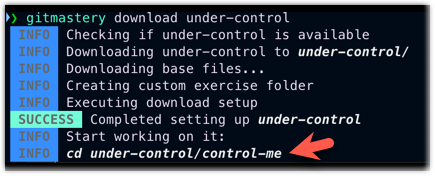
Put the folder under-control/control-me under Git's control (i.e., initialise a repository in the control-me folder).
To verify your work:
- i.Navigate to anywhere inside the
gitmastery-exercises/under-controlfolder (or any sub-folder of it). - ii.Run the
gitmastery verifycommand.
To reset the exercise and start over, navigate to the gitmastery-exercises/under-control folder and run the gitmastery progress reset command.
To download the exercise:
- i.Navigate inside the
gitmastery-exercisesfolder. - ii.Run
gitmastery download stage-frightcommand.
Your task:
The attendance repo has three unstaged files. Stage them.
To verify your work:
- i.Navigate to anywhere inside the
gitmastery-exercises/stage-frightfolder (or any sub-folder of it). - ii.Run the
gitmastery verifycommand.
To reset the exercise and start over, navigate to the gitmastery-exercises/stage-fright folder and run the gitmastery progress reset command.
To download the exercise:
- i.Navigate inside the
gitmastery-exercisesfolder. - ii.Run
gitmastery download staging-interventioncommand.
Your task:
In the repo intervention given, unstage the following files: adam.txt, josh.txt, mary.txt.
Keep other files staged.
To verify your work:
- i.Navigate to anywhere inside the
gitmastery-exercises/staging-interventionfolder (or any sub-folder of it). - ii.Run the
gitmastery verifycommand.
To reset the exercise and start over, navigate to the gitmastery-exercises/staging-intervention folder and run the gitmastery progress reset command.
To download the exercise:
- i.Navigate inside the
gitmastery-exercisesfolder. - ii.Run
gitmastery download grocery-shoppingcommand.
Your task:
In the shopping-list repo given, there is a shopping-list.txt.
- Edit it to remove at least one item from the shopping list and add at least one new item to the shopping list.
- Stage the change and commit it.
To verify your work:
- i.Navigate to anywhere inside the
gitmastery-exercises/grocery-shoppingfolder (or any sub-folder of it). - ii.Run the
gitmastery verifycommand.
To reset the exercise and start over, navigate to the gitmastery-exercises/grocery-shopping folder and run the gitmastery progress reset command.
To download the exercise:
- i.Navigate inside the
gitmastery-exercisesfolder. - ii.Run
gitmastery download remote-controlcommand.
Your task:
- As per the usual practice,
cdinto theremote-controlfolder. - Run
gitmastery verifycommand. - Take note of the repo name provided by Git-Mastery app (in its response).
- Create a new public GitHub repository using the repo name given.
- Provide the URL of that remote (without the
.gitat the end) when prompted
e.g.,https://github.com/johndoe/gitmastery-johndoe-remote-control
To verify your work:
- i.Navigate to anywhere inside the
gitmastery-exercises/remote-controlfolder (or any sub-folder of it). - ii.Run the
gitmastery verifycommand.
To reset the exercise and start over, navigate to the gitmastery-exercises/remote-control folder and run the gitmastery progress reset command.
To download the exercise:
- i.Navigate inside the
gitmastery-exercisesfolder. - ii.Run
gitmastery download link-mecommand.
Your task:
In the link-this repo provided, add the git-mastery/link-me repository as a remote named upstream.
To verify your work:
- i.Navigate to anywhere inside the
gitmastery-exercises/link-mefolder (or any sub-folder of it). - ii.Run the
gitmastery verifycommand.
To reset the exercise and start over, navigate to the gitmastery-exercises/link-me folder and run the gitmastery progress reset command.
To download the exercise:
- i.Navigate inside the
gitmastery-exercisesfolder. - ii.Run
gitmastery download push-overcommand.
Your task:
Create a new commit on the main branch of the local repo in push-this folder, and push the updated main branch to the remote.
To verify your work:
- i.Navigate to anywhere inside the
gitmastery-exercises/push-overfolder (or any sub-folder of it). - ii.Run the
gitmastery verifycommand.
To reset the exercise and start over, navigate to the gitmastery-exercises/push-over folder and run the gitmastery progress reset command.
To download the exercise:
- i.Navigate inside the
gitmastery-exercisesfolder. - ii.Run
gitmastery download ignoring-somethingcommand.
Your task:
1. Update the .gitignore file (inside the files/ folder) to reflect the following requirements:
- Git should ignore every file in the
many/folder except the filemany/file22.txt. why_am_i_hidden.txtshould not be ignored by Git.ignore_me.txtshould be ignored by Git.- Git should ignore any
runaway.txtfile inthis/and any of its current and future subfolders (hint: use a pattern).
2. Commit the updated .gitignore file.
To verify your work:
- i.Navigate to anywhere inside the
gitmastery-exercises/ignoring-somethingfolder (or any sub-folder of it). - ii.Run the
gitmastery verifycommand.
To reset the exercise and start over, navigate to the gitmastery-exercises/ignoring-something folder and run the gitmastery progress reset command.
To download the exercise:
- i.Navigate inside the
gitmastery-exercisesfolder. - ii.Run
gitmastery download fork-repocommand.
Your task:
Fork the repo https://github.com/git-mastery/gm-shapes to your GitHub account, while retaining the original repo name gm-shapes.
To verify your work:
- i.Navigate to anywhere inside the
gitmastery-exercises/fork-repofolder (or any sub-folder of it). - ii.Run the
gitmastery verifycommand.
To reset the exercise and start over, navigate to the gitmastery-exercises/fork-repo folder and run the gitmastery progress reset command.
To download the exercise:
- i.Navigate inside the
gitmastery-exercisesfolder. - ii.Run
gitmastery download clone-repocommand.
Your task:
- Fork the repo https://github.com/git-mastery/gm-shapes to your GitHub account, if you haven't done so already. Retain the original repo name
gm-shapes. - Clone the fork to your computer, placing it in the folder
clone-repo/shapes(note how the target folder isshapes, notgm-shapes).
If you did this step correctly, you should now have local reposhapes. - Set up a remote named
upstreamin thatshapesrepo, to point to the upstream repo git-mastery/gm-shapes.
To verify your work:
- i.Navigate to anywhere inside the
gitmastery-exercises/clone-repofolder (or any sub-folder of it). - ii.Run the
gitmastery verifycommand.
To reset the exercise and start over, navigate to the gitmastery-exercises/clone-repo folder and run the gitmastery progress reset command.
To download the exercise:
- i.Navigate inside the
gitmastery-exercisesfolder. - ii.Run
gitmastery download fetch-and-pullcommand.
Your task:
You have been given a clone of the git-mastery/gm-shapes repo.
- Another developer Alice has created a remote copy of this repo at https://github.com/git-mastery/gm-shapes-alice which seems to have an additional commit in the
mainbranch.- Add that repo as a remote named
alice-upstream. - Bring over Alice's additional commit to your repo.
- Add that repo as a remote named
- Alice's friend Bob has copied Alice's repo to https://github.com/git-mastery/gm-shapes-bob, and added one more commit.
- Add that repo as another remote named
bob-upstream. - Download the metadata about this new commit (i.e., fetch, not pull or merge) to your repo.
- Add that repo as another remote named
To verify your work:
- i.Navigate to anywhere inside the
gitmastery-exercises/fetch-and-pullfolder (or any sub-folder of it). - ii.Run the
gitmastery verifycommand.
To reset the exercise and start over, navigate to the gitmastery-exercises/fetch-and-pull folder and run the gitmastery progress reset command.
To download the exercise:
- i.Navigate inside the
gitmastery-exercisesfolder. - ii.Run
gitmastery download side-trackcommand.
Your task:
While you are working on a small Python project in the branch-me repo, you discovered two bugs. You wish to fix them in a separate branch named bug-fix, as two separate commits.
The steps to follow are given below:
This repo uses main (not master) as the default branch.
- Create a branch named
bug-fix.
Switch to that branch. - Update the
greet.pyfile so that thegreetfunction uses thenamevariable in the output, as follows:- print("Hi Alice") + print(f"Hi {name}") - Update the
calculator.pyfile such that theaddfunction returns the sum of two numbers, as follows:def add(a, b): - return a - b + return a + b - Switch back to the
mainbranch.
The final result should be something like this:
gitGraph BT:
    %%{init: { 'theme': 'default', 'gitGraph': {'mainBranchName': 'main'}} }%%
    commit id: "[HEAD → main] ..."
    branch bug-fix
    commit id: "Fix greet.py"
    commit id: "[feature] Fix calculator.py"
    checkout main
To verify your work:
- i.Navigate to anywhere inside the
gitmastery-exercises/side-trackfolder (or any sub-folder of it). - ii.Run the
gitmastery verifycommand.
To reset the exercise and start over, navigate to the gitmastery-exercises/side-track folder and run the gitmastery progress reset command.
To download the exercise:
- i.Navigate inside the
gitmastery-exercisesfolder. - ii.Run
gitmastery download branch-bendercommand.
Your task:
Do the following operations in the given webapp repo, in the given order:
- Merge
feature/loginonto themainbranch, while ensuring a merge commit is created (i.e., no fast-forwarding). - Merge
feature/dashboardonto themainbranch. - Merge
feature/paymentsonto themainbranch.
The final result should look like this:
gitGraph
commit
branch feature/login
checkout main
branch feature/dashboard
checkout main
branch feature/payments
checkout feature/login
commit
commit
checkout main
merge feature/login
checkout feature/dashboard
commit
commit
commit
checkout main
merge feature/dashboard
checkout feature/payments
commit
commit
checkout main
merge feature/payments
To verify your work:
- i.Navigate to anywhere inside the
gitmastery-exercises/branch-benderfolder (or any sub-folder of it). - ii.Run the
gitmastery verifycommand.
To reset the exercise and start over, navigate to the gitmastery-exercises/branch-bender folder and run the gitmastery progress reset command.
To download the exercise:
- i.Navigate inside the
gitmastery-exercisesfolder. - ii.Run
gitmastery download conflict-mediatorcommand.
Your task:
The given repo conflict has an unmerged branch josh and a merged branch john.
Merge branch josh onto main. This will result in a merge conflict in the script.py file.
Resolve the merge conflict and complete the merge.
The intended outcome is print('Hello Everyone and World!').
To verify your work:
- i.Navigate to anywhere inside the
gitmastery-exercises/conflict-mediatorfolder (or any sub-folder of it). - ii.Run the
gitmastery verifycommand.
To reset the exercise and start over, navigate to the gitmastery-exercises/conflict-mediator folder and run the gitmastery progress reset command.
To download the exercise:
- i.Navigate inside the
gitmastery-exercisesfolder. - ii.Run
gitmastery download branch-renamecommand.
Your task:
In the rename-this repo, rename the login branch to feature/login.
Expected result:
gitGraph BT:
    commit id: "m1"
    commit id: "m2"
    branch feature/login
    commit id: "b1"
    checkout main
    commit id: "[HEAD → main] m3"
    checkout feature/login
    commit id: "[feature/login] b2"
To verify your work:
- i.Navigate to anywhere inside the
gitmastery-exercises/branch-renamefolder (or any sub-folder of it). - ii.Run the
gitmastery verifycommand.
To reset the exercise and start over, navigate to the gitmastery-exercises/branch-rename folder and run the gitmastery progress reset command.
To download the exercise:
- i.Navigate inside the
gitmastery-exercisesfolder. - ii.Run
gitmastery download branch-deletecommand.
Your task:
- Delete the
optimization-approach-1branch. - Delete the
optimization-approach-2branch as well.
Expected outcome:
gitGraph BT:
    commit id: "Implement loading"
    commit id: "Fix loading bug"
    branch _
    commit id: "Apply bubble sort"
    commit id: "Fix sorting bug"
    checkout main
    merge _ id: "[HEAD → main] Merge ...'...approach-1"
To verify your work:
- i.Navigate to anywhere inside the
gitmastery-exercises/branch-deletefolder (or any sub-folder of it). - ii.Run the
gitmastery verifycommand.
To reset the exercise and start over, navigate to the gitmastery-exercises/branch-delete folder and run the gitmastery progress reset command.